Find Every Package
in Seconds.
Driver AID Scanner reads the 3-digit code on any Amazon label with your phone camera and instantly tells you exactly where that package belongs. No more digging through stacks. No more missed stops.
Built by drivers, for drivers. Free to use. Package tools work offline.
Features
Everything You Need. Nothing You Don't.
Every second counts when you have a route of 200 stops. Driver AID Scanner gives you total control.
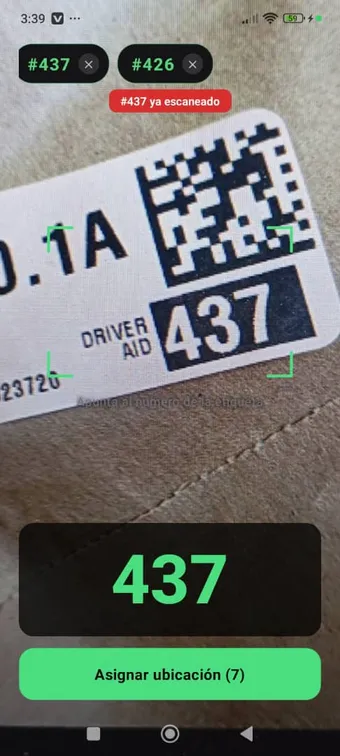
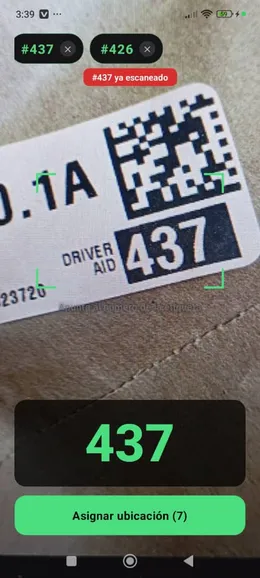
Real-Time Camera Scanning
The app reads Driver AID numbers continuously as you move the camera. No tapping, no shutter button — it detects and locks on automatically.
Instant Package Lookup
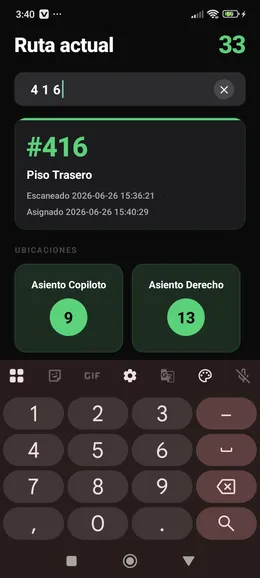
Type any 3-digit code in the search screen and see the package location in less than a second. Perfect for the moment a customer flags you down.
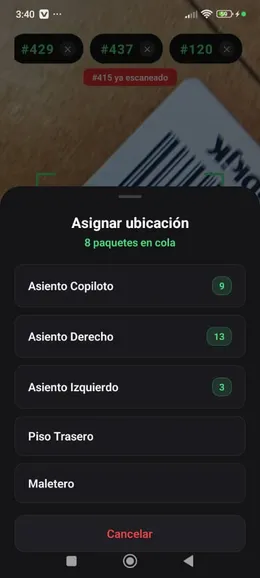
Car Location Sorting
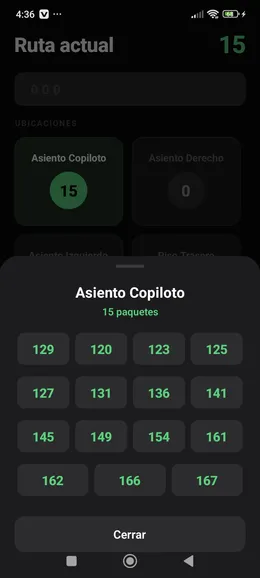
Assign packages to passenger seat, rear floor, trunk, or other car locations during loading. The app builds your route map as you go.
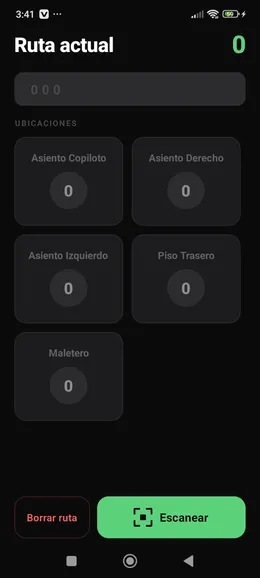
Full Route Overview
See every scanned package and its location on a single screen. Filter by location, check totals, and stay on top of your entire delivery load.
Package Tools Work Offline
Scanning, storage, and lookup run on your phone. Mileage fuel estimates may use internet when available, but package organization stays local.
English & Spanish Support
Switch the app language in Settings with one tap. Fully localised for both English and Spanish-speaking drivers.
Sound & Vibration Feedback
Get a satisfying beep and haptic pulse every time a code is detected. Customisable in Settings to match your driving environment.
Lightweight & Battery-Friendly
Designed for delivery blocks without heavy account setup. Optional mileage tracking uses location only while the tracker is active.
How It Works
Three Steps to a Faster Route
Scan
Open the app and point your camera at the label. Driver AID Scanner instantly detects the 3-digit number — no tapping, no button pressing. Just point and it reads.
Assign a Location
The first time you scan a package, assign it to a car location such as passenger seat, rear floor, or trunk. The app remembers it for the entire route.
Find Any Package Instantly
Need a specific package at a stop? Type the code in the lookup screen. The app shows you the exact car location within milliseconds.
See It In Action
Built for the Car. Tested on the Road.
Five screens. One powerful workflow. Everything you need to master your delivery route.
The Numbers Speak for Themselves
3
Digits that change your whole route
< 1s
Time to find a package after scanning
~2 hrs
Saved per driver per shift (estimated)
Local
Package data stays on your phone
FAQ
Questions Drivers Ask
What is a Driver AID number?
It's the 3-digit number printed inside a black box on every Amazon delivery label. It's a unique identifier that links a specific package to your route manifest. Driver AID Scanner reads it automatically with your camera.
Does the app work without an internet connection?
Package scanning, storage, and lookup run locally on your phone. Optional mileage fuel estimates may use internet when available, but package organization does not depend on a connection.
Which phones does it work on?
Driver AID Scanner is built for iPhone and Android phones with a rear camera. iPhone support is focused on modern iOS devices; Android support works on most Android 8.0 or newer phones.
Do I need an Amazon account or work login?
No. The app has no login screen and does not connect to Amazon's systems. It works as a standalone tool that you control entirely.
Does it drain the battery?
The app is optimized for long shifts. Camera processing is efficient and the app goes to standby between scans. Optional mileage tracking uses location while a block is active, so battery use depends on how long you keep tracking enabled.
What happens to my route data?
Package scans, locations, and mileage history are stored on your device. Package data is not sent to our servers. When your shift ends, you can clear the route in one tap to start fresh the next day.
Why does mileage tracking ask for location?
The optional block mileage tracker uses location only while a tracking session is active to calculate miles, duration, and estimated fuel cost. Background location is used so the mileage count can continue while you deliver.
Can I use it in Spanish?
Yes. Open Settings and switch the language to Spanish in one tap. All screens, labels, and messages switch immediately.
Is it free?
Yes. Driver AID Scanner is free to download and use. No subscriptions, no in-app purchases.
"I load up to 180 packages every morning. This app made me the fastest loader on my team. I know exactly where every package is before I leave the depot."
Marcus T.
DSP Driver · Atlanta, GA ★★★★★
Built for Delivery Blocks
Start Your Next Route Smarter
Scan Driver Aid numbers, sort packages by car location, and optionally track block miles from your phone.
No login required · Package data stays on your device